Built for people who bill for their time.Freelancers, consultants, contractors.
Soft Desk keeps your projects, hours, clients, invoices, mail, meetings and files in one workspace, with an assistant you can type to or talk to. The Individual account is free.
Meetings
- Client call — from Google CalendarOpen
- Open the meeting link from the rowOpen
Tasks due today
- Task with priority and due dateOpen
- Overdue tasks listed firstOpen
Money
- Work to invoiceOpen
- Invoices to send or chaseOpen
To-dos
- Personal to-do (carried over from yesterday)Open
Same work.A different day.
Without it
Billable hours slip away
Work happens across the day; by Friday you are rebuilding it from memory to invoice a client.
Invoices chased by hand
You do not know whether a client has opened the invoice, so you write the follow-up anyway.
Mail and meetings in other windows
Gmail in one tab, Calendar in another, the task you are working on in a third.
No view of today
What is due, who you are meeting, what needs to be billed: each answer lives in a different place.
With Soft Desk
Time is captured as you work
Start a timer or add a manual entry; it links to the project and task, marked billable or not. Overlapping entries are refused.
Invoices come from the work
Build an invoice from a client's unbilled work, send a public link, see when it is viewed, record the payment.
Gmail, Calendar and Drive inside the app
Read and reply to mail, see the week's events, browse files, all without leaving the workspace.
One Today page
Meetings, tasks due, work to invoice, invoices to chase and your to-dos, with a link into each item.
Everything a solo practice runs on.Nothing you have to stitch together.
Today
Time tracking
Projects and boards
Clients, invoices and finance
Inbox
Meetings
Documents
Assistant: chat and voice
Search, notes, notifications
From unbilled work to a paid invoice.Without a spreadsheet in between.
Every client record shows hours, unbilled work and outstanding amounts. When it is time to bill, the invoice is built from that unbilled work: hourly time, milestones, retainers, fixed-price progress, or free-form lines you add yourself.
Send it as a public link or a PDF. A tracking pixel marks the invoice as viewed, and read receipts are detected in your own mailbox, so you know whether to chase. Record payments in the ledger, including partial payments, and the invoice status follows: draft, sent, paid, partial, overdue or void.
- Invoice numbering per user or per project
- Saved payment details placed on every invoice
- Payments ledger: record, edit and delete payments, partial payments included
- Finance overview per currency: received, invoiced, outstanding, overdue, drafts, top clients and monthly bars
- 1
Unbilled work
Hourly time, milestones, retainers, fixed-price progress, free-form lines
- 2
Draft
Numbered per user or per project; your saved payment details on the invoice
- 3
Sent
Public invoice link and PDF
- 4
Viewed
Open tracking marks the invoice as viewed; read receipts detected in your own mailbox
- 5
Paid or partial
Payments recorded in the ledger; overdue and void when they apply
Finance overview, shown per currency.
Ask it, or say it.It answers with links into your work.
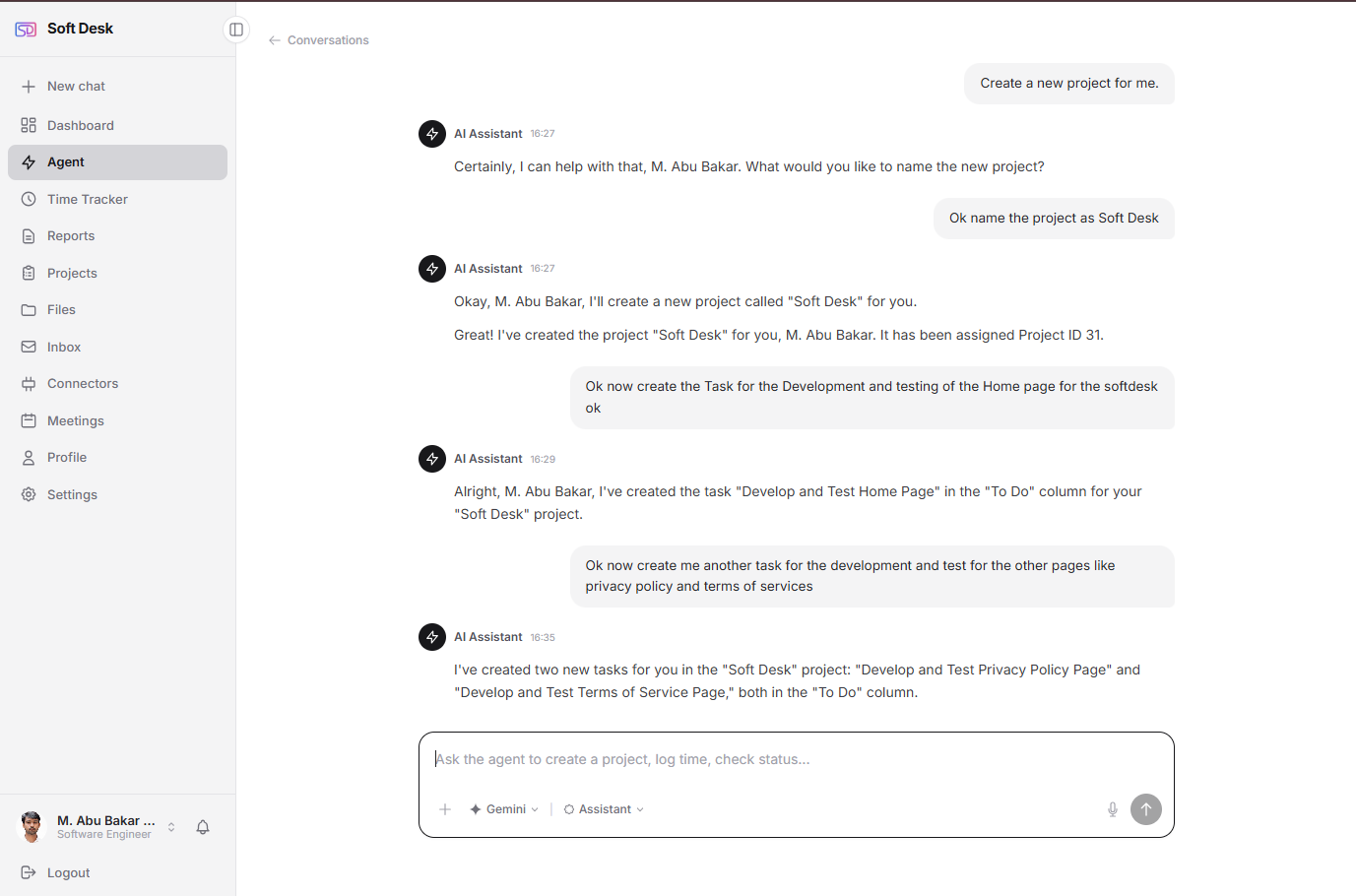
The chat assistant answers questions about your workspace: projects, tasks, time, clients, invoices, payments, the finance overview, meetings and your day plan. It creates and updates tasks and projects. Every answer deep-links into the app. Anything that changes data waits for your explicit approval.
The voice assistant listens for a wake word (you choose its name), holds a spoken conversation in a desktop Chrome browser, answers out loud, shows lists and tables on screen only when they help, can be interrupted, and ignores background speech.
- Bring your own key: Anthropic Claude, Google Gemini or OpenAI. The platform never bills AI on your behalf.
- Names are replaced by tokens, and emails, phones and addresses are stripped before anything reaches a provider.
- No access to mailbox content or files. The assistant has no email tools.
The Individual account costs nothing.Not a trial. Not a tier.
Sign up and everything described on this page is yours to use. No card, no seat count, no expiry.
Included
- Today, projects and boards, time tracking, reports
- Clients, invoices, payments ledger, finance overview
- Inbox, meetings and documents with your Google accounts
- Notes, search, notifications, realtime sync between tabs
- Chat and voice assistant with your own AI key
You only need
- A Google account, and only if you want mail, calendar and files inside the app.
- An AI key from Anthropic, Google or OpenAI, and only if you want the assistant.
Common questions from solo professionals.
Working with a team?
Your whole practice,in one workspace.
Start with a free Individual account. Connect Google and an AI key when you want them.
Free for individuals. No card required.